Io icon online production tool introduction
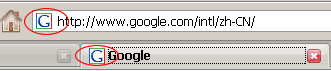
1、favicon.icoUsually used as a front thumbnail of the URL, as a website logo, favicon.ico is displayed on the address bar or label of the browser, as shown in the following figureIn the circleAt present, almost all browsers support ico icons.
2. When the favicon.ico icon file is successfully generated, the browser will automatically pop up the ico icon download. Click Save to place the generated downloaded favicon.ico icon under the root directory (or other directories).
3, in the page source file<head></head>Insert between tags<link rel="shortcut icon" href=" /favicon.ico" />。